
OpenSnitch Firewall is one of the most powerful open-source application firewalls available for Linux users who want complete control over outgoing network connections. Unlike traditional firewalls that mainly focus on incoming traffic, OpenSnitch monitors and controls applications attempting to access the internet in real time. It gives users the ability to allow, deny, or create custom rules for every connection request.
OpenSnitch has become increasingly popular among privacy-focused users, cybersecurity professionals, developers, and Linux enthusiasts because of its transparency and detailed connection monitoring system. With an easy-to-use graphical interface and advanced rule management options, it offers both simplicity for beginners and flexibility for advanced users who need deeper network control and security customization.
What Is OpenSnitch Firewall?
OpenSnitch is an interactive application firewall designed primarily for Linux operating systems. It works by monitoring outgoing internet connections from applications installed on a computer. Whenever a program tries to connect to the internet, OpenSnitch immediately alerts the user and asks whether the connection should be allowed or blocked.
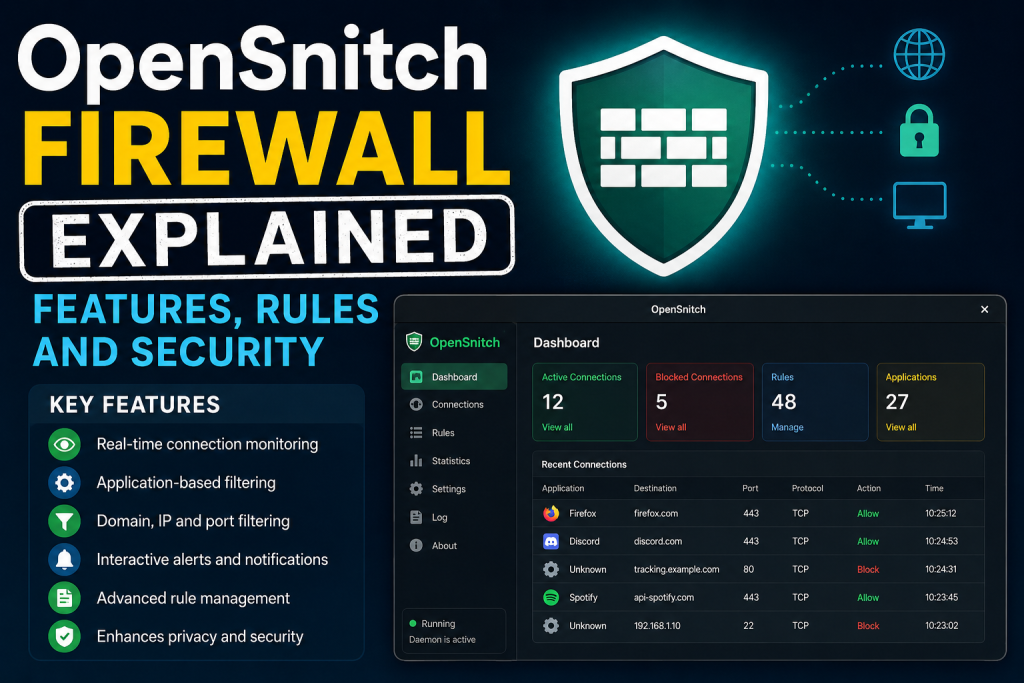
The firewall is inspired by Little Snitch, a well-known firewall application for macOS. However, OpenSnitch is fully open-source and specifically tailored for Linux environments. It enables users to monitor network behavior, detect suspicious activity, and gain complete visibility into how applications communicate online.
Unlike traditional firewalls that rely heavily on port-based filtering, OpenSnitch focuses on application-level traffic management. This approach provides more accurate and user-friendly security controls because users can manage permissions based on specific applications, domains, IP addresses, or ports.
Why OpenSnitch Is Important
Modern applications constantly communicate with external servers for updates, analytics, advertisements, cloud synchronization, and telemetry collection. Many users are unaware of how frequently their installed software sends data across the internet.
OpenSnitch helps solve this issue by making all outgoing connections visible. Instead of silently allowing applications to communicate online, it gives users direct control over every request.
The firewall is important because it:
- Prevents unauthorized internet access
- Improves privacy protection
- Detects suspicious application behavior
- Blocks telemetry and tracking
- Reduces malware communication risks
- Gives transparency into network activity
- Helps manage application permissions
For privacy-conscious users, OpenSnitch acts as a strong defensive layer against hidden tracking systems and unwanted data collection.
How OpenSnitch Works
OpenSnitch operates using a daemon and a graphical user interface. The daemon runs in the background and continuously monitors outgoing network connections. When an application requests internet access, the daemon intercepts the request and forwards it to the user interface.
The user then receives a pop-up notification displaying important details such as:
- Application name
- Destination IP address
- Domain name
- Port number
- Protocol type
- Process information
The user can choose to:
- Allow the connection
- Deny the connection
- Create a permanent rule.
- Create a temporary rule.
- Define advanced filtering options.
Once a rule is created, OpenSnitch automatically applies it whenever similar connections occur in the future.
Main Features of OpenSnitch Firewall
Real-Time Connection Monitoring
One of the most useful features of OpenSnitch is its ability to monitor outgoing connections in real time. Every attempt to access the internet is displayed instantly, allowing users to react immediately.
This feature helps users identify unknown or suspicious applications attempting unauthorized communication.
Interactive Firewall Prompts
Whenever an application tries to connect online, OpenSnitch displays a pop-up window asking for user approval. The prompt contains detailed information about the connection request.
Users can quickly decide whether the connection is safe or potentially harmful.
Application-Based Filtering
Traditional firewalls mainly work with ports and IP addresses. OpenSnitch takes a more user-friendly approach by allowing filtering based on applications.
For example, users can:
- Allow Firefox internet access.
- Block unknown applications
- Restrict gaming applications
- Prevent background telemetry services.
This application-focused filtering system simplifies firewall management.
Domain-Based Rules
Users can create rules targeting specific domains. This feature is useful for blocking advertisements, trackers, analytics systems, or unwanted servers.
For instance, a user can block a telemetry domain while still allowing the main application to function normally.
IP Address Filtering
Advanced users can filter connections using IP addresses or IP ranges. This provides greater precision for network control.
IP filtering can help:
- Block suspicious servers
- Restrict geographic regions
- Allow internal network communication.
- Create enterprise-level rules
Port and Protocol Filtering
OpenSnitch supports rule creation based on ports and network protocols.
Users can:
- Allow HTTPS traffic only.
- Block SSH connections
- Restrict FTP traffic
- Control DNS requests
This level of customization improves security management.
System-Wide Network Visibility
The firewall dashboard provides detailed statistics about all network activity occurring on the system.
Users can view:
- Active connections
- Historical traffic
- Application activity
- Rule usage
- Network protocols
- Data transfer information
This visibility helps users better understand how their system interacts with the internet.
Rule Management System
The rule management system in OpenSnitch is highly flexible and customizable. Users can create simple or advanced rules depending on their security requirements.
Rules can be configured based on:
- Application
- Domain
- IP address
- Port
- Protocol
- User
- Duration
- Network interface
This flexibility makes OpenSnitch suitable for both home users and professionals.
Temporary and Permanent Rules
When a connection request appears, users can create either temporary or permanent rules.
Temporary rules are useful for short-term access needs, while permanent rules help automate future decisions.
For example:
- Allow browser updates permanently.
- Block telemetry temporarily
- Permit software installation for one session
This approach prevents unnecessary repetitive prompts.
Process Monitoring
OpenSnitch monitors running processes and identifies which applications are making network requests.
This process-level visibility helps users:
- Detect hidden background services.
- Identify malware behavior
- Understand software communication patterns.
- Improve troubleshooting
Detailed Logging
The firewall maintains detailed logs of network activity. These logs include timestamps, destination information, rule actions, and application details.
Logs are useful for:
- Security investigations
- Troubleshooting
- Monitoring suspicious activity
- Understanding application behavior
Desktop Notifications
OpenSnitch provides desktop notifications whenever new network requests appear. These alerts ensure users stay informed about application activity in real time.
Notifications improve responsiveness and security awareness.
Integration With Linux Systems
OpenSnitch integrates smoothly with Linux distributions and existing firewall frameworks.
It works alongside technologies such as:
- nftables
- iptables
- UFW
- NetworkManager
This compatibility ensures flexibility across different Linux environments.
OpenSnitch Security Benefits
Protection Against Malware
Malware often communicates with remote servers to send stolen data or receive commands. OpenSnitch helps block such communication attempts.
Even if malware infects a system, the firewall can prevent it from accessing external servers.
Blocking Spyware and Trackers
Many applications collect user data silently. OpenSnitch allows users to identify and block these tracking systems.
This feature is particularly valuable for users concerned about privacy and surveillance.
Enhanced Privacy
OpenSnitch improves privacy by giving users full control over outgoing data transfers.
Users can prevent:
- Telemetry collection
- Behavioral tracking
- Analytics reporting
- Hidden background synchronization
Preventing Data Leaks
Sensitive data can sometimes leave a system without user awareness. OpenSnitch minimizes this risk by controlling outbound communication.
This protection is especially important for organizations handling confidential information.
Increased Transparency
One of the biggest security advantages of OpenSnitch is transparency. Users gain complete visibility into network activity that would otherwise remain hidden.
Transparency improves trust and helps users make informed security decisions.
OpenSnitch Rule Types Explained
Simple Rules
Simple rules allow or deny traffic based on a single condition.
Examples include:
- Allow Firefox permanently
- Block unknown_app temporarily
These rules are easy for beginners to manage.
Advanced Rules
Advanced rules combine multiple conditions for greater control.
For example:
- Allow Firefox only on port 443
- Block telemetry domains for specific applications
- Permit SSH only on local networks.
Advanced rules provide enterprise-level flexibility.
Time-Based Rules
Some rules can operate for a specific duration.
Examples:
- Allow updates for one hour.
- Permit temporary software downloads.
Time-based rules reduce long-term exposure risks.
User-Based Rules
Administrators can create rules specific to user accounts.
This feature is useful in shared systems or enterprise environments where different users require different permissions.
Network Interface Rules
Rules can also target specific network interfaces.
Examples:
- Allow traffic only on Wi-Fi.
- Restrict mobile hotspot connections.
- Block traffic on public networks.
This improves security for portable devices.
OpenSnitch Dashboard Overview
The OpenSnitch dashboard acts as the central management hub for monitoring and controlling network activity.
The dashboard typically displays:
- Active applications
- Connection history
- Rule statistics
- Traffic analysis
- Alerts and events
The interface is clean and designed to simplify firewall management.
Understanding OpenSnitch Alerts
When a new connection request appears, users should carefully review the alert details.
Important information includes:
- Which application initiated the request
- The destination server
- The port number
- The protocol used
- Whether the request appears legitimate
Understanding these alerts is critical for effective firewall usage.
Best Practices for OpenSnitch Security
Review Rules Regularly
Over time, rules can become outdated or unnecessary. Users should periodically review and clean up old rules.
This helps maintain a secure and organized configuration.
Avoid Blindly Allowing Connections
Many users automatically click “Allow” without understanding the request. This behavior weakens security.
Users should carefully evaluate connection requests before approving them.
Block Unknown Applications
Applications with unfamiliar names or suspicious behavior should be investigated before internet access is granted.
Blocking unknown software reduces security risks.
Use Least Privilege Principles
Applications should only receive the minimum network access necessary for functionality.
Restricting unnecessary permissions improves overall system security.
Monitor Logs Frequently
Reviewing logs helps identify unusual patterns or unauthorized communication attempts.
Frequent monitoring improves threat detection.
Combine OpenSnitch With Other Security Tools
OpenSnitch works best when combined with additional security solutions such as:
- Antivirus software
- Intrusion detection systems
- VPN services
- System hardening tools
Layered security provides stronger protection.
OpenSnitch vs Traditional Firewalls
Traditional Firewalls
Traditional firewalls mainly focus on:
- Incoming traffic
- Port filtering
- Network-level protection
While effective, they often lack detailed application awareness.
OpenSnitch Firewall
OpenSnitch focuses on:
- Outgoing traffic monitoring
- Application-based control
- User interaction
- Real-time visibility
This approach offers greater transparency and user-level control.
Key Differences
| Outgoing Traffic Control | Limited | Advanced |
| Application Awareness | Basic | Detailed |
| Interactive Prompts | Rare | Real-Time |
| User Visibility | Low | High |
| Rule Flexibility | Moderate | Extensive |
OpenSnitch for Privacy Protection
Privacy has become a major concern in modern computing. Many applications collect data silently without user awareness.
OpenSnitch helps protect privacy by exposing hidden communication channels.
Users can block:
- Advertising servers
- Analytics platforms
- Telemetry systems
- Tracking domains
This level of control is highly valuable for journalists, researchers, developers, and privacy advocates.
OpenSnitch for Developers
Developers benefit significantly from OpenSnitch because it provides visibility into application network behavior.
Developers can:
- Debug network requests
- Test APIs
- Monitor application traffic
- Detect unexpected communication
- Improve software transparency
This makes OpenSnitch a useful development and debugging tool.
OpenSnitch in Enterprise Environments
Although OpenSnitch is popular among personal Linux users, it can also support enterprise environments.
Organizations can use it to:
- Restrict unauthorized software
- Monitor outbound communication
- Improve compliance
- Reduce insider threats
- Protect sensitive information
However, enterprise deployment may require centralized management strategies.
Common OpenSnitch Use Cases
Blocking Telemetry
Many Linux users install OpenSnitch specifically to block telemetry systems from sending usage data.
Monitoring Unknown Software
Users can monitor newly installed applications before granting full internet access.
Preventing Background Tracking
Applications often run hidden background services that collect analytics data. OpenSnitch helps identify and block them.
Securing Development Environments
Developers can test software communication behavior safely.
Protecting Research Systems
Researchers working with sensitive information can reduce data exposure risks.
Limitations of OpenSnitch
Despite its strengths, OpenSnitch also has limitations.
Linux-Focused Support
OpenSnitch is primarily designed for Linux systems and does not officially support all operating systems.
Frequent Prompts for Beginners
New users may initially feel overwhelmed by the number of connection requests.
Learning how to interpret prompts takes time.
Requires User Awareness
The firewall is only effective if users make informed decisions.
Blindly approving connections can weaken protection.
Not a Complete Security Solution
OpenSnitch is powerful, but should not replace comprehensive cybersecurity practices.
Users still need:
- Secure passwords
- System updates
- Antivirus protection
- Backup strategies
OpenSnitch Installation Overview
Installing OpenSnitch typically involves:
- Downloading packages
- Installing the daemon
- Installing the graphical interface
- Starting services
- Configuring rules
Most modern Linux distributions support OpenSnitch installation through packages or repositories.
OpenSnitch User Interface Explained
The graphical interface is designed for simplicity and efficiency.
Users can:
- View active connections
- Search logs
- Edit rules
- Create custom filters
- Analyze network activity
The interface balances accessibility with advanced functionality.
OpenSnitch and Linux Security Culture
Linux users often value transparency, customization, and open-source software. OpenSnitch aligns perfectly with these principles.
It empowers users by:
- Revealing hidden connections
- Supporting open-source development
- Allowing complete customization
- Improving system awareness
This philosophy has contributed to OpenSnitch’s growing popularity in the Linux community.
Future of OpenSnitch Firewall
As privacy concerns continue growing, tools like OpenSnitch are becoming increasingly important.
Future developments may include:
- Improved user interfaces
- Better enterprise support
- Enhanced automation
- AI-assisted rule management
- Expanded protocol analysis
- Cross-platform compatibility
The demand for transparent network monitoring solutions will likely continue increasing.
How OpenSnitch Improves Digital Awareness
One overlooked benefit of OpenSnitch is education. Users begin understanding how applications communicate online.
This awareness helps users:
- Recognize risky software
- Improve cybersecurity habits
- Understand internet protocols
- Make better privacy decisions.
OpenSnitch transforms invisible network activity into understandable information.
OpenSnitch Firewall for Advanced Users
Advanced users can build highly customized security policies using OpenSnitch.
Examples include:
- Blocking cloud synchronization services
- Restricting containerized applications
- Creating development testing environments
- Managing server communication rules
Its flexibility makes it suitable for professional use cases.
OpenSnitch and Open-Source Security
Because OpenSnitch is open-source, users can inspect its codebase, contribute improvements, and verify its security practices.
Open-source development offers several benefits:
- Transparency
- Community-driven improvements
- Faster bug detection
- Increased trust
This model strengthens overall software reliability.
Understanding Connection Decisions
When OpenSnitch displays a connection request, users should evaluate:
- Is the application trusted?
- Is the destination legitimate?
- Is internet access necessary?
- Does the timing seem suspicious?
Developing this awareness significantly improves system security.
Managing False Positives
Sometimes legitimate applications trigger alerts that may appear suspicious.
Users should:
- Research unfamiliar domains
- Verify application behavior
- Test temporary rules first.
- Avoid making assumptions
Balanced decision-making improves usability and security.
OpenSnitch for Educational Purposes
Students studying cybersecurity or networking can use OpenSnitch to learn about:
- TCP/IP communication
- Application networking
- Firewall rules
- Traffic analysis
- Security monitoring
The visual interface makes network learning more practical and interactive.
OpenSnitch Community Support
The OpenSnitch community contributes through:
- Documentation
- Bug reports
- Feature requests
- Tutorials
- Rule examples
Community support plays a major role in improving usability and development.
Optimizing OpenSnitch Performance
To maintain smooth performance:
- Remove unused rules
- Limit excessive logging
- Monitor resource usage
- Keep software updated
Optimization helps prevent unnecessary system overhead.
OpenSnitch and Ethical Computing
OpenSnitch supports ethical computing practices by encouraging transparency and informed consent.
Users gain visibility into how software behaves rather than relying on blind trust.
This approach aligns with modern digital rights and privacy principles.
Conclusion
OpenSnitch Firewall is a powerful and intelligent application firewall that gives Linux users deep visibility and control over outgoing internet connections. Its real-time monitoring, application-based filtering, advanced rule management, and privacy-focused features make it one of the most valuable open-source security tools available today.
OpenSnitch not only improves cybersecurity but also increases digital awareness by exposing hidden network activity that many users never realize exists. Whether used for blocking telemetry, monitoring suspicious software, protecting privacy, or strengthening enterprise security, OpenSnitch delivers a flexible and transparent solution for modern network management. As online privacy concerns continue growing, tools like OpenSnitch will remain essential for users who want greater control over their systems and internet communication.